Region System
Purpose
- Service to Service authentication (such as API -> Real-Time)
- Staff to Internal Service authentication (such as Staff Laptop -> internal.example.com)
Why
Other methods of server to service authentication are painful. You're probably using IP allow-listing or preset tokens, if that, let's be honest most of you are hoping someone never finds your internal endpoints (I feel sick at the idea of that). The region system creates a registry where each service can sign data, identify itself, and the endpoint service can verify that data came from a specific service, you can also seemlessly route between services (at a load-balancer level) and manage Access Control to internal services, such as Dashboards, for Staff members!
Use Cases
Scenario 1
Here we have a service called "Video-Ingest". The "Video-Ingest" service is responsible for handling uploaded videos sent over HTTPS in chunks, after the video has been fully uploaded, it runs the necessary processing for those videos. For security reasons. The "Video-Ingest" service needs to reach out to the "API" service to GET https://api.example.com/internal/video/upload-urls so it can get a list of presigned S3 upload URLs, to upload all relevant video files to S3. Leaving an internal endpoint that allows upload to S3 without proper access control is extremely dangerous. Here's how we could secure that endpoint with the Region System.
C#
using Regions;

public class get_upload_urls_data {
    public string chunk { get; set; }
}

String jwt = await Regions.Sign(new get_upload_urls_data {
    videoid = "my_super_cool_video_id"
});

UriBuilder uriBuilder = new UriBuilder("https://api.example.com/internal/video/upload-urls");
var queryParams = System.Web.HttpUtility.ParseQueryString(string.Empty);
queryParams["signedObject"] = jwt;

uriBuilder.Query = queryParams.ToString();
string urlString = uriBuilder.ToString();

WebRequest request = WebRequest.Create(urlString);
request.Method = "GET";

WebResponse response = request.GetResponse();

string response_data = null;
using (Stream request_stream = response.GetResponseStream())
{
    StreamReader reader = new StreamReader(request_stream);
    string responseFromServer = reader.ReadToEnd();
    if (!String.IsNullOrWhiteSpace(responseFromServer)) {
        response_data = responseFromServer;
    }
}

response.Close();
Node.js
import express from "express";
import Regions from "region-system"

const headers = {};

function getRegionCreds() {
    return {
        whoami: null,
        acceptable_registries: [
            { url: "dns://registry.example.com", cache: 120, publickey: "[Registry Public Key]" }
        ]
    }
}

try {
    const app = express();

    app.get("/internal/video/upload-urls", async (req, res) => {
        try {
            let fullQueryStringV = req.originalUrl.split("?");
            if (!fullQueryStringV || !fullQueryStringV[1]) {
                fullQueryStringV = "";
            } else {
                fullQueryStringV = "?"+fullQueryStringV[1];
            }
            const fullQueryString = fullQueryStringV;

            const urlData = new URL(`https://example.com/${fullQueryString}`);
            if (!urlData.searchParams) {
                throw "Search arams are null, probably invalid parameters."
            }
            const params = urlData.searchParams;

            const signedObject = params.get("signedObject"); // Get the incoming signedObject (which is a JWT).
            if (!signedObject) {
                res.writeHead(400, headers);
                res.end(`params.signedObject not specified.`);
            }

            try {
                const VerifyStatus = await Regions(getRegionCreds()).verify(signedObject);
                // Expected output: { ok: true, capability: "video-ingest", body: { videoid: "my_super_cooL_video_Id" } };
                if (VerifyStatus.capability != "video-ingest") {
                    throw `Invalid capability, expected "video-ingest", got "${VerifyStatus.capability}"`;
                }
            } catch (error) {
                console.log("Region fail message: ", error);
                res.writeHead(500, headers);
                res.end(`Invalid Region Credentials.`);
            }

            res.writeHead(200, headers);
            res.end(`You successfully authenticated!`);
        } catch (error) {
            console.log("ERROR", error);
            res.writeHead(500, headers);
            res.end(`Internal Server Error`);
        }
    });
} catch (error) {
    console.log("ERROR", error);
}
Scenario 2
Let's say you're a real-time service responsible for delivering events to clients. You've setup an endpoint at https://realtime.api.example.com/internal/event/send, every time an event needs to fire, a POST request is made to this address, typically from the API, this makes it extremely easy to broadcast events from various internal services without hard-coding APIs in the real-time service. The POST request contains information about the event, such as the type of event, event data and IDs of the specific clients you need to send that event too. Here, you can verify the incoming data is legitimate (signed) and from a specific source, thus applying effective access control to your endpoint:
using System.Diagnostics;
using System.Text;
using System.Text.Json;
using System.Net;
using Newtonsoft.Json;

var builder = WebApplication.CreateBuilder(args);

builder.Services.AddCors();

var MyAllowSpecificOrigins = "_myAllowSpecificOrigins";

builder.Services.AddCors(options =>
{
    options.AddPolicy(name: MyAllowSpecificOrigins,
    policy  =>
    {
        policy.WithOrigins("https://realtime.api.example.com", "https://localhost:3000")
        .AllowAnyHeader()
        .AllowAnyMethod();
    });
});

var app = builder.Build();

app.UseCors(MyAllowSpecificOrigins);

app.UseExceptionHandler("/Error");

app.UseHttpsRedirection(); // Redirect all clients from http:// to https://
app.UseStaticFiles();
app.UseCors();
app.UseRouting();

app.MapGet("/error", async (HttpContext context) => {
    var errorA = new Objects.errorD
    {
        error = true,
        message = "Sorry, a fatal error occured on the server. These are rare! Please try again.",
    };
    context.Response.StatusCode = 500;
    await context.Response.WriteAsJsonAsync(errorA);
});

app.MapPost("/cool-event", async(HttpContext context) => {
    try {
        Console.WriteLine("/cool-event");

        string textData = await reader.ReadToEndAsync();

        RegionResponse region_response = null;
        try {
            region_response = await Regions.verify(textData);
            if (region_response.capability != "api") {
                throw new Exception($"Expected \"api\", got \"{region_response.capability}\"");
            }
        } catch {
            context.Response.ContentType = "text/plain";
            context.Response.Write("Invalid Region Credentials");
            return;
        }

        // Now you can run whatever logic you want, such as sending out an event over SignalR, communicating with APIs, literally whatever you want, because now you know this is an authorized client.

        context.Response.ContentType = "text/plain";
        context.Response.Write("Successfully authenticated!");
    } catch (Exception e) {
        Console.WriteLine(e);

        context.Response.ContentType = "text/plain";
        context.Response.Write("Internal Server Error");
        return;
    }
});
Ok, what are registries?
In the region system, whenever a client wants to verify a request, it will check the registry value listed in the authentication packet, if that registry is in it's allow-list, it will reach out to that registry and fetch the relevant entries (such as the relevant region, capability and publickey of that capability). Each registry type returns the same data, but in (very) slightly different formats, with different methods of getting that data. Libraries take care of reaching out to the required registry and verifying the data for you.
Registry types include:
- DNS: Entries are stored in DNS and fetched by the client using DNS TXT Lookups. A DNS registry is nice because you don't need to worry about keeping registry servers up, however, DNS is heavily cached but using a DNS server like 1.1.1.1 with a low TTL in both the DNS record and DNS client should be perfectly fine for most people.
- HTTPS: a GET request is made to
/region/[region-id]/capability/[capability]to get the required entry data. That webserver should return a response like:
{
  "regions": [
    {..}
  ],
  "capabilities": [
    {..}
  ]
}
- Local Storage: All entries are stored on the system and passed to the client. It can be stored anywhere, such as a file, environment variable, you name it (it just needs to get to the program somehow). The response format is the same as HTTPS.
How do I create a registry?
Read "What are regions?", "What are capabilities?" and Types of objects before continuing to read How do I create a registry?, it will make things significantly easier.
What are Regions?
You need to group capabilities by Region (if you're using Staff authentication, you can just set the region to something like "Staff", it doesnt't matter in that context). You should consider something to be in the same region when everything in that region could have local network access to each other (if there wasn't a firewall). For example, a datacenter in London where all the servers are on the same networking equipment would be a region. You can define what a region is however you see fit, but those are generally good rules to follow.
What are Capabilities?
Capabilities can be a service or a user. Examples:
- Say you had a cluster of API pods running in your "London1" region, that would be a capability, such as.
{
    "active": true,
    "capability": "api",
    "created": 1698054937655,
    "updated": 1698054937655,
    "exp": 2707206937655,
    "publickey": "-----BEGIN PUBLIC KEY-----\nMIGbMBAGByqGSM49AgEGBSuBBAAjA4GGAAQADMVXVsB5zDBXezp4ocDxDLzqe/lK\nwZuwqfvyceIqMArTscT9tQ0LXXErg7YMxVo0Aj6POdfkw3MlWsE5ZV8rZxMBqbJv\n27+Vdro8WuPqTBk1cEJkfW6BxQQV/NxZkEwFSwYGj3CcLUBO/KVO8r+U/vgDObuc\nIjotLyoNSd16HJB5JzE=\n-----END PUBLIC KEY-----\n",
    "region_id": "london1",
}
- Say you had a user that just logged in and you need to add an entry for them to the registry so they can authenticate with services. You'd add a capability entry such as:
{
    "active": true,
    "capability": "user_KJWHJQAHVCTBZXJWKAZQ1686797899106",
    "created": 1698054937655,
    "updated": 1698054937655,
    "exp": 2707206937655,
    "publickey": "-----BEGIN PUBLIC KEY-----\nMIGbMBAGByqGSM49AgEGBSuBBAAjA4GGAAQADMVXVsB5zDBXezp4ocDxDLzqe/lK\nwZuwqfvyceIqMArTscT9tQ0LXXErg7YMxVo0Aj6POdfkw3MlWsE5ZV8rZxMBqbJv\n27+Vdro8WuPqTBk1cEJkfW6BxQQV/NxZkEwFSwYGj3CcLUBO/KVO8r+U/vgDObuc\nIjotLyoNSd16HJB5JzE=\n-----END PUBLIC KEY-----\n",
    "region_id": "users",
}
NOTE: You do not need to prepend "user_" to the capability name (the capability name can be whatever you want) and the region_id can also be whatever you want, such as a specific team. It's just formatted like this because, in production, labelling which capabilities are services and which are staff is helpful.
You can learn more about Capabiltiy objects here
DO NOT ENTER ANY PERSONAL OR IDENTIFIABLE INFORMATION INTO REGISTRIES FOR THE SECURITY AND PRIVACY OF THE USER, REGISTRIES ARE PUBLIC.
DNS Registry Explaination
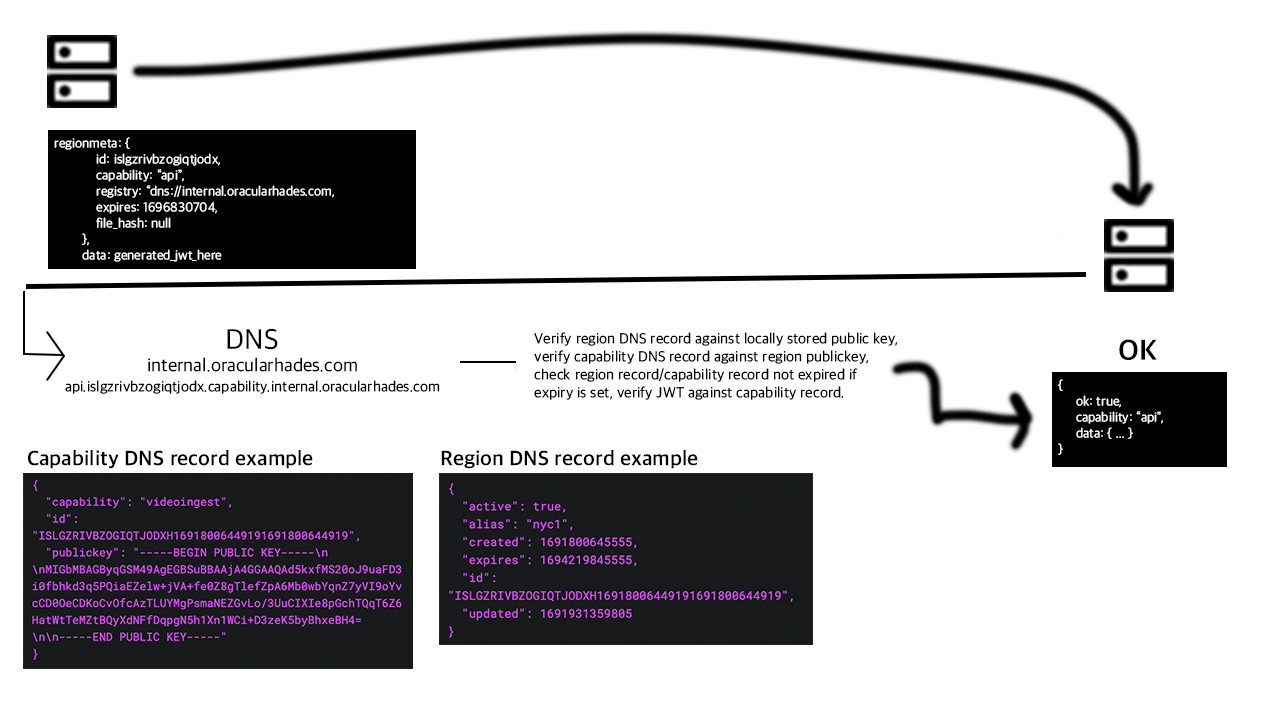
Types of Objects
Staff to Internal Service Authentication! (Scenario 3)
This is so cool, it needs it's own page :)
Supported Languages:
Tools
- Region Manager: A desktop application to setup and manage regions, if you prefer a desktop app instead of code. You can also get an overview of your registries, which makes debugging easier.